Listen to article:
At a glance
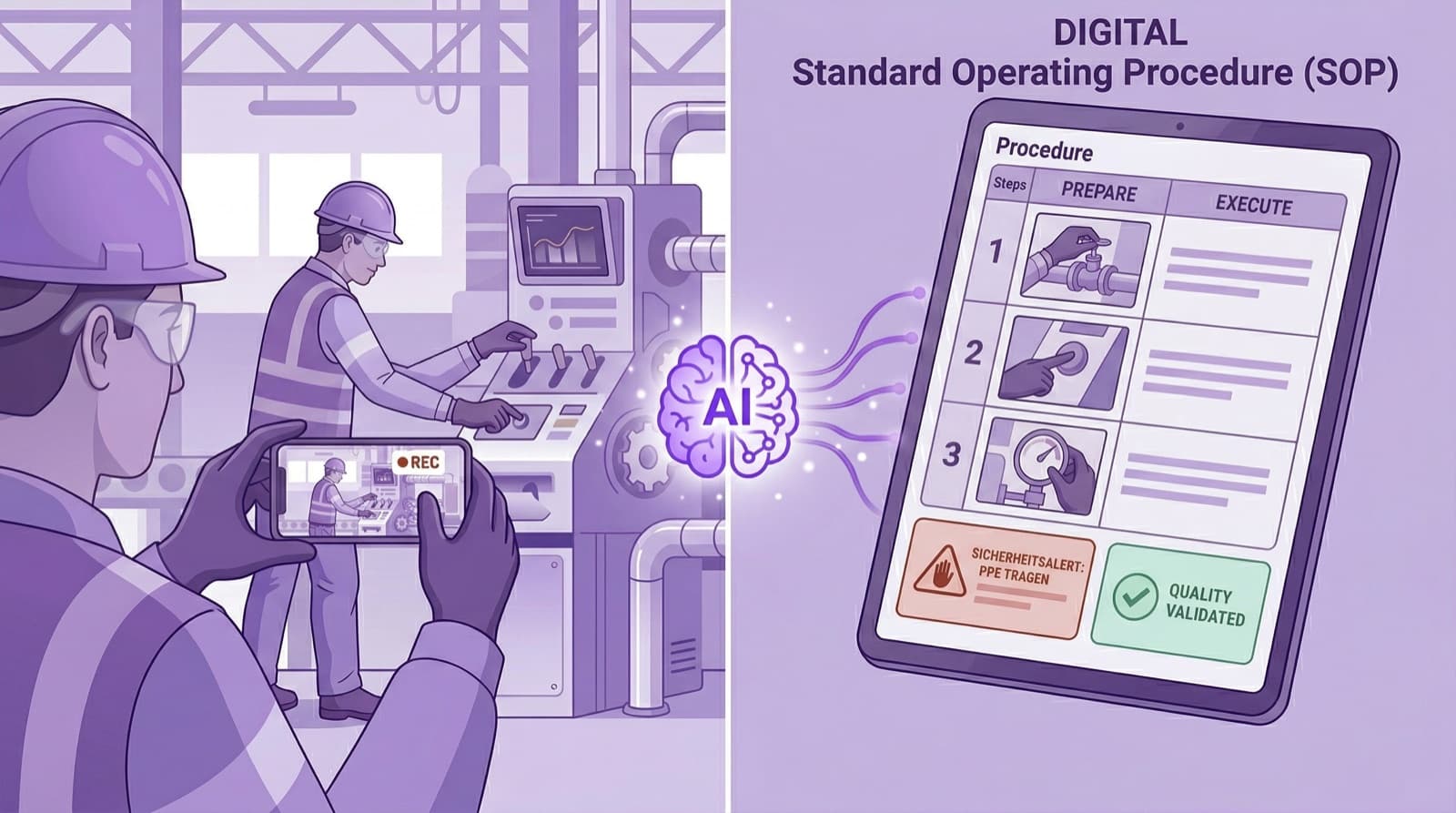
- 1.Video-to-SOP automatically turns a process video into a structured work instruction with images, safety callouts, and quality checks.
- 2.Time per SOP drops from an industry average of 4–8 hours (the Word method) to roughly 10 minutes.
- 3.Works across every industry with physical processes — from steel and pharma to foodservice.
- 4.Faces are anonymized automatically (GDPR-compliant); the SOP is accessible at the machine via QR code.
How a 5-minute smartphone video becomes a complete, audit-ready work instruction — and why the traditional Word method no longer scales.
Video-to-SOP is the automatic conversion of a process video into a structured, audit-ready work instruction using artificial intelligence. An experienced operator demonstrates the process while a colleague films and narrates what is happening — much like a nature documentary commentator. An AI then analyzes both the video and audio and generates a complete SOP in minutes, with step-by-step images, safety notes, and quality checks.
How does Video-to-SOP work?
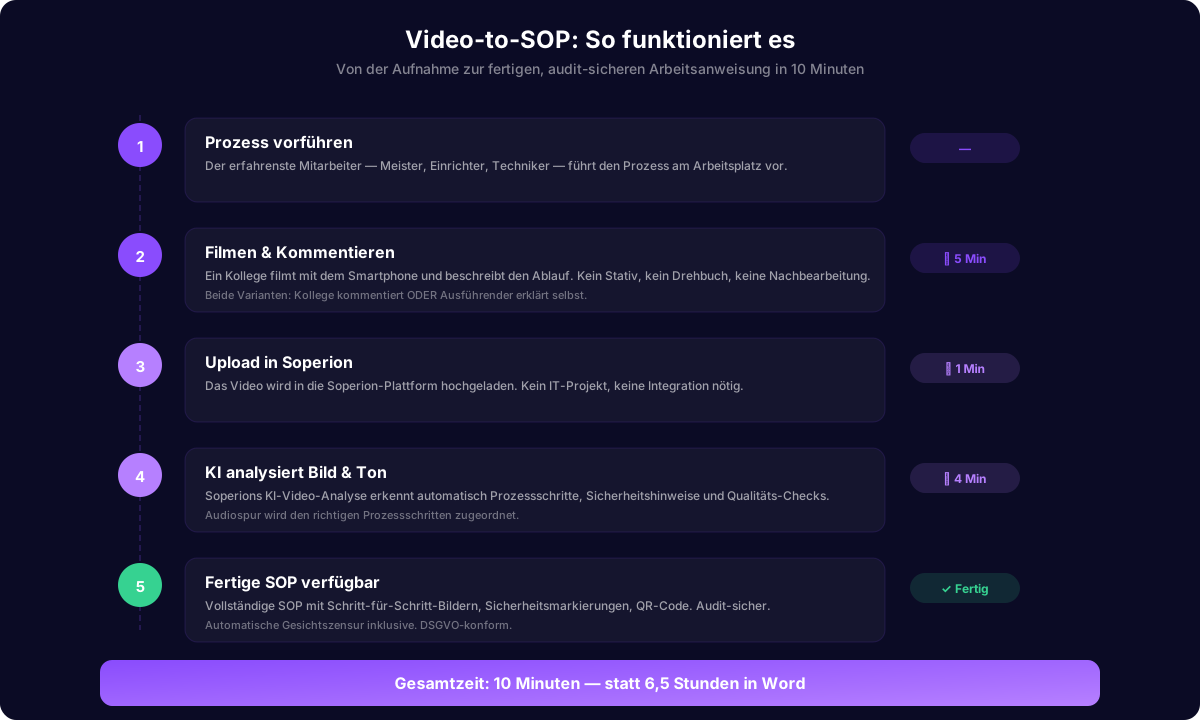
The process works on a two-person principle: the most experienced operator — the foreman, the setter, the 20-year technician — demonstrates the process. A colleague films with a smartphone and describes what is happening. No tripod, no script, no post-production. Just two people, one smartphone, and five minutes.
Alternatively, the operator performing the work can explain what they are doing while the colleague only films. Either way, Soperion’s AI processes the audio track and aligns the explanations with the correct process steps.
The AI video analysis examines both the visual track and the audio. It extracts the individual work steps, generates illustrated step-by-step instructions, and transcribes the commentary. In addition, Soperion automatically anonymizes all faces in the video (GDPR-compliant), color-codes safety-critical steps, and produces a QR code that grants instant access at the machine.
Why Video-to-SOP replaces the traditional method
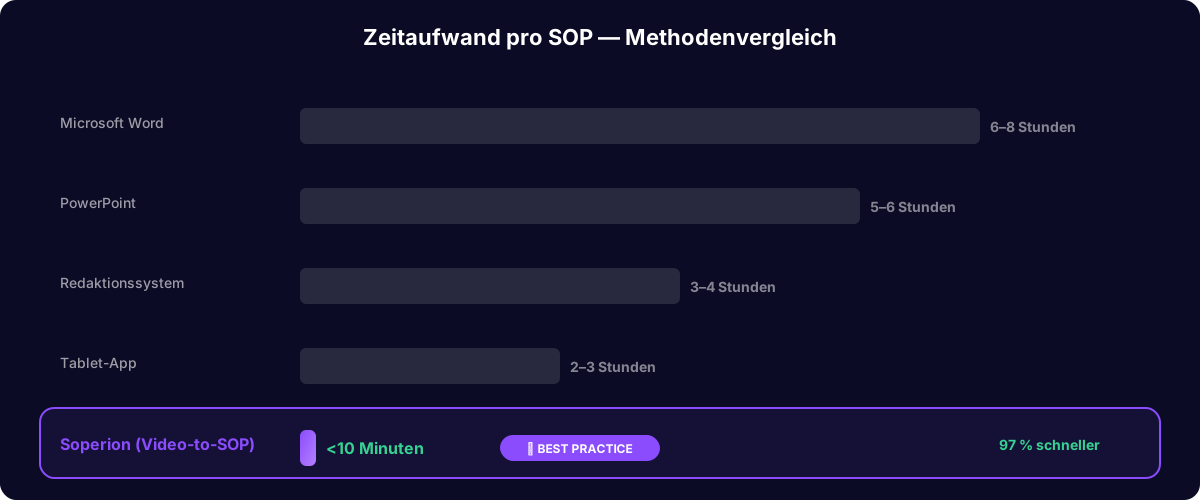
Traditional SOP creation — observe, take notes, photograph, write in Word, format, review — takes on average 4 to 8 hours per SOP, based on industry experience.
Video-to-SOP cuts this to roughly 10 minutes: 5 minutes filming, a few minutes of AI processing, and a quick review and release. From a typical 6-hour baseline, that is a reduction of about 97 percent (360 minutes to 10). A company with 200 processes completes full documentation in weeks instead of years.
| Method | Time per SOP | Suited for |
|---|---|---|
| Word method (traditional) | 4–8 hrs | Manual authoring, rarely updated SOPs |
| Editorial/content system | 3–5 hrs | Manual authoring with version control |
| Manual video documentation | 4–12 hrs | Training videos, no structured SOP |
| Screen recording tools | 5–15 min | Screen-based/software processes only |
| Video-to-SOP (AI) | approx. 10 min | Physical processes in factories, warehouses, hospitals |
Which industries benefit the most?
Video-to-SOP is ideal for industries with physical processes that do not happen at a computer. Unlike screen-recording tools, which document digital workflows, Video-to-SOP captures real work in factories, workshops, warehouses, and hospitals.
The most relevant use cases: steel and metals (LOTO procedures, maintenance), automotive and Tier-1 suppliers (assembly processes, IATF-compliant work instructions), pharma (cleanroom procedures, GxP-compliant SOPs), chemicals (operating instructions under GefStoffV), food (HACCP hygiene SOPs), hospitals (CSSD, hygiene protocols), logistics, and quick-service restaurants.
Video-to-SOP vs. screen recording
A common misconception: Video-to-SOP is not the same as screen-recording tools. Screen recorders capture on-screen actions and turn them into click-by-click instructions for software — ideal for IT training, but useless for physical processes.
Video-to-SOP processes real camera footage from the physical world: How is a roll stand maintained? How is a cleanroom gown donned correctly? How does a LOTO procedure work at a high-voltage switchboard? You cannot screen-record these processes — you have to film them.
Case in point: a LOTO SOP in an industrial plant
A maintenance technician needs to document a lockout-tagout procedure on a filter unit. With the traditional method: two days (observation, notes, photos, Word document, review cycles).
With Video-to-SOP: he performs the LOTO procedure while a colleague films and narrates. Five minutes. Soperion’s AI produces a complete SOP with more than 20 steps, safety callouts, and an escalation plan. He reviews, corrects a valve label, and signs off. Total elapsed time: about 12 minutes. One FTSE-250 company used this workflow to cut SOP creation from several hours to under 10 minutes per process.
Frequently asked questions
- Who speaks during filming — the person filming or the operator?
- We recommend that the person filming narrates, much like a documentary voice-over. Alternatively, the operator can explain while performing the work. The AI handles both variants.
- Does Video-to-SOP work offline?
- Filming happens offline on any smartphone. AI processing requires an internet connection. Videos can be uploaded later.
- Do you need special cameras?
- No. Any recent smartphone is enough. In very noisy environments an external microphone helps. The AI also handles videos with background noise.
- Is Video-to-SOP GDPR-compliant?
- Yes. All faces are anonymized automatically. No biometric data is stored. The SOP documents the process, not the person.